Showing posts with label kids. Show all posts

Saturday, July 3, 2021

Page 8 - My Top 5 Makerspace Ideas of the Week (June 27 - July 3)


Greetings, it's me, Alberto, but you can call me the Makerspace Guy!

Summer is here and it's grilling time!  We all know you need a fire burning in your barbeque grill to cook steaks, hamburgers, or hotdogs.   Every fire starts with a spark.


Sometimes reading about a little idea will ignite an even bigger idea to cook up somethin' mighty good! ๐Ÿ‘

For this post, I've decided to share five favorite, easy-to-make ideas inspired by my students.  Each month of May, before summer break, I collect a list of "Bright Ideas" from my kindergarten through 5th-grade kids.  These are special challenges based on projects they come up with on their own and create in Makerspace.  When school lets out, the entire list is emailed to all the school families, so they may try the challenges themselves over the break.  ---  Your kids can easily create these at home too or in class.


Notice, I have not included step-by-step instructions.  As previously mentioned, often I simply share a project idea or photo of the item with my students, which encourages them to use their imaginations and figure out how to build their version of the creation!  

You see, our Makerspace station-time is like free-play.  Over the years, many of my Maker Kids have commented how much they enjoy the freedom to create whatever they want, in their own way.  I find that it really opens the door to exploration and creativity!

From this year's "Bright Idea" list, please allow me to present my...

for the week of June 27 - July 3, 2021


5.) Make a fun, moving taco puppet.  ---  NOTE: You don't have to wait till Tuesday to make this taco! ๐Ÿ˜


4.) Using cardboard, build a model of a robot.  Challenge yourself to include one moving part,... or more!


3.) Create an exciting, original board game with a time travel theme!


2.) Construct a cool Bug Bed and Breakfast for real-life bugs!  (Or plastic toy bugs ones if parents freak out!)  ---  Remember, guests don't stay long at a B & B, so make sure those cute little insects get released after a short stay.


1.) Build a working birdfeeder or birdhouse for those fine feathered friends fluttering outside your home!


* * * * * * * * * * * * * * * * * * * * *
Well, friends, I hope you've been inspired by this week's TOP 5.  As I remind my students, remember to take these little idea-sparks and make them bigger, better, and uniquely your own!


I can't wait to see what ignites my interest to include as part of next week's list!

Please feel free to leave any questions or suggestions in the comment section.


---  Stay creative, The Makerspace Guy


(Pictures collected for the collages, as well as the gif and photos used for this blog entry were all found online.) 

* * * * * * * * * * * * * * * * * * * * *

To read the previous TOP 5 list click on the link:


I'd love for us to keep in touch!  So, I invite you to my main online platforms:

Please "Follow" and share my Makerspace blog, here on Blogger @
The Makerspace Guy.

You can also connect with me through social media:


Twitter: @makerspaceguy 

Instagram: @makerspaceguy

Pinterest: @makerspaceguy

NOTE: Simply click on the orange links to get to each site.


#Makerspace #MakerspaceGuy #TheMakerSpaceGuy #STEM #STEMeducation #STEAM #STEAMeducation #art #crafts #ArtsAndCrafts #CraftsForKids #EasyCraftsForKids #MakerspaceOnABudget #ElementarySchool #TipsForTeachers #TeachingTips #ClassroomTips #Top5

Saturday, June 26, 2021

Page 5 - My Top 5 Makerspace Ideas of the Week (June 20-26)


Greetings, it's me, Alberto, but you can call me the Makerspace Guy!

When I was a kid, I heard a beautiful children's song in church entitled PASS IT ON.  The lyrics began with, 

"It only takes a spark to get a fire going. ๐Ÿ”ฅ"


Well, every week I come across several bright ideas that spark brilliant future lesson plans!  Some ideas I find online, others in books, but most are inspired by something as simple as a song, TV commercial, or a work of art hanging in a museum.


For this post, I've decided to share five favorite, easy-to-make ideas I came across this week.  However, notice I have not included step-by-step instructions.  ("What, no instructions!?  What a predicament!" ๐Ÿ˜ฑ)  Often I simply share a project idea or photo of the item with my students, then encourage them to use their imaginations and figure out how to build their version of the creation!  

You see, our Makerspace Station time is like free-play.  Over the years, many of my Maker Kids have commented how much they enjoy the freedom to create whatever they want, in their own way.  I find that it really opens the door to exploration and creativity!


So now, please allow me to present my...


for the week of June 20 - 26, 2021


5.) Make a momma or daddy origami dog.  Then, use a smaller paper square to create a puppy!


4.) Using cardboard, build a model of a dog house for a stuffed toy doggie, origami dog, or even a real-life pet pooch!


3.) Construct puppets that resemble underwater creatures!  They can be stick puppets, marionettes, hand puppets, finger puppets, or even eerie shadow puppets!


2.) Using items found around your room, fashion together a working spinner, then time it with a stopwatch.  (Online stopwatches work just as well.)  ---  Want to make it a competition?  Invite others to join you in making spinners and see who spins their structure the longest!


1.) Create something cool out of materials that were going to be thrown away.  ---  NOTE: Be certain the items are clean and free of hazardous chemicals.


* * * * * * * * * * * * * * * * * * * * *

Well, friends, I hope you've been inspired by this week's TOP 5.  I can't wait to see what inspires me in the coming week and prompts me to PASS IT ON to you via next week's list!

Please feel free to leave any questions or suggestions in the comment section.


---  Stay creative, The Makerspace Guy


(Pictures collected for the collages, as well as the gif and photos used for this blog entry were all found online.) 

* * * * * * * * * * * * * * * * * * * * *


I'd love for us to keep in touch!  So, I invite you to my main online platforms:

Please "Follow" and share my Makerspace blog, here on Blogger @
The Makerspace Guy.

You can also connect with me through social media:


Twitter: @makerspaceguy 

Instagram: makerspaceguy

Pinterest: @makerspaceguy

NOTE: Simply click on the orange links to get to each site.


#Makerspace #MakerspaceGuy #TheMakerSpaceGuy #STEM #STEMeducation #STEAM #STEAMeducation #art #crafts #ArtsAndCrafts #CraftsForKids #EasyCraftsForKids #MakerspaceOnABudget #ElementarySchool #TipsForTeachers #TeachingTips #ClassroomTips #Top5

Thursday, June 24, 2021

Page 4 - Motivate to Create, Using Posters!


Greetings, it's me, Alberto, but you can call me The Makerspace Guy!

Do the walls of your classroom inspire and motivate your students to create?  Or do they look similar to the walls of a solitary confinement cell?

My current room is located behind the school in a portable building.  Upon joining the staff, the principal gave me a walk-through of my future classroom.  When I entered I cringed, because my first thought was, "This looks like a dingy bar!"


No way, no how, was it a space conducive to any kind of creativity!  The room needed a total makeover!  ---  NOTE:  More on the attack plan I used will be shared in a future blog entry.


In addition to artwork, it's my opinion that colorful, motivational posters are essential for elementary school Makerspace areas.  On countless occasions, I've had kids come up and show me a project they created that was inspired by a sign they saw hanging on the Makerspace wall.  Or they'll quote a motivational poster out loud to another student to offer encouragement.

Keeping the posters topical rather than thematic will even work for students with sensory issues.  (For example displaying posters that reflect the topic of Makerspace, rather than the theme of "Kitty Cats" just because you like kitty cats.)


By the way, I purchase and own most of my classroom posters, so I can hang on to them, in case I move to a new school or town.  (Speaking from experience, starting from scratch isn't always fun.๐Ÿ‘Ž)


Now, here is my all-time favorite motivational poster.  "TA-DA!"


PRODUCT INFORMATION:
Measurements: 13 3/8" wide x 19" high
Brand:  Creative Teaching Press
GTIN:  00030554072888

The price range, as of this post, is about $3.39 - $10.16 online, depending on the vendor.  Shipping is usually separate.


TEACHING TIP:


Just because the poster is hanging on the wall doesn't mean children will understand the meaning.  Motivational posters make more of an impact on your students if you explain what they mean.


PRACTICAL TIP:


"Save the staples, save the wall!"

I love using Poster Putty (a.k.a. Mounting Putty, Adhesive Putty, Tac 'N Stick), but since I teach inside a portable in Texas, the weather right outside the walls often causes my posters to fall down if I use putty alone.

Adding a staple or two to the top of each sign was a quick fix, but left holes in my posters and the wall.  However, recently I started fastening binder clips to the top of each poster.  I then hang the binder ring on the wall with a pushpin, and lastly secure the edges of the decoration with Mounting Putty.

Adjusting posters is now so much easier too!

Also, I try to hang new posters in the same spot as old ones, so there won't be pushpin holes all over the walls.


MONEY-SAVING HACKS:


  • Create posters!  Search online for motivational slogans which apply to your class.  Then hand out poster boards to your students and have them draw signs of the slogan while including their original artwork!   ---  NOTE: I hardly ever give out full-sized 22" x 28" poster boards.  Instead, I cut the boards in half by using the giant guillotine-style cutter in the teachers' workroom.  This not only saves money, but since my classes are only 50 minutes in length, it makes it easier for the kids to fill up the blank space of their posters.  
  • Use white poster boards.  They're cheaper than color and they don't fade as easily.  Also, the artwork shows up better on white.
  • Have your students come up with their own original motivational slogans and images!
  • Laminate your posters to give them longer life!  Make sure there's enough laminating film in the machine before you put each sign through the process, so they won't get ruined.


BRIGHT IDEAS:


  • Plan a lesson or unit around the poster's message.  Example: Ask your students to come up with 5 items located in the classroom which they can use to draw a picture.  Take samples of those items (pencil, crayon, marker, color pencil, chalk) and place them in a box.  Preferably a clear box.  Now give the kids 10 minutes to create a quick and simple picture of a flower WITHOUT using items like those in the box.  Explain that they can use various items found in the room.  Afterward, have a discussion about the true meaning of "Think Outside the Box."
  • Ask your students to come up with examples of famous creative people who thought "outside the box", or maybe share about a time they themselves had a different approach to something.
  • Take a picture of the poster, or find the exact image online, and include it in your PowerPoint or Google Slides class presentations.


Well, friends, I hope this blog entry has given you all some helpful and exciting ideas to try in your own classrooms.  Please feel free to leave any questions or suggestions in the comment section.


---  Stay creative, The Makerspace Guy


(Pictures collected for the collages, as well as the photos used for this blog entry were all found online.) 

* * * * * * * * * * * * * * * * * * * * *

I'd love for us to keep in touch!  So, I invite you to my main online platforms:

Please "Follow" and share my Makerspace blog, located here on Blogger @
The Makerspace Guy.

You can also connect with me through social media:


Twitter: @makerspaceguy 

Instagram: makerspaceguy

Pinterest: @makerspaceguy

NOTE: Simply click on the orange links to get to each site.


#Makerspace #MakerspaceGuy #TheMakerSpaceGuy #STEM #STEMeducation #STEAM #STEAMeducation #art #crafts #ArtsAndCrafts #CraftsForKids #EasyCraftsForKids #MakerspaceOnABudget #ElementarySchool #TipsForTeachers #TeachingTips #ClassroomTips

#ClassroomDecorations #ClassroomPosters #classroomdecor #classroomsetup #MotivationalPosters #Motivation #Inspire

Monday, June 21, 2021

Page 2 - Easy Origami for Kids (K-5th)


Greetings, it's me, Alberto, but you can call me the Makerspace Guy!

In my classroom, students are invited to visit various creative stations.  A popular destination is the Origami Station, where kids follow instructions to create structures out of paper.


ori·​ga·​mi | \ หŒศฏr-ษ™-หˆgรค-mฤ“  \ -  the Japanese art or process of folding squares of paper into representational shapes.
(Merriam-Webster Online Dictionary)


Instructing kids to make origami can seem rather overwhelming, especially when teaching kinder kids who are just starting school.


I've purchased many "How-To-Make" origami books and checked out several from the school library, but the number one book I recommend is EASY ORIGAMI by John Montroll.  He's my favorite author of origami instructional books. 

This step-by-step manual comes with easy-to-follow instructions and photos.

It works well for kindergarten through 5th-grade students.


TEACHING TIP:

On Day 1 of introducing origami to your students, start with the dog pattern for all grades.  It's the easiest pattern to follow and the simplest project to create.  On Day 2, introduce the cat.  Kids love dogs and cats!  As we know, children tend to enjoy creating things they like.  ---  Therefore, you may want to avoid teaching your students to make origami Brussel sprouts. ๐Ÿ˜Š

If your students are struggling, remind them to look at the next step for help!  See what your project should look like when you complete the current step.


PRACTICAL TIP:


Before you present your students with a pattern, you better practice making the origami structure yourself at least a couple of times.  ---  I learned the hard way to never introduce a pattern I cannot complete myself.  You'll always have students that have questions or need help.


MONEY-SAVING HACK:


Origami paper is super expensive, especially if you are buying paper for the entire student body.  Since most patterns require square paper, we cut our own.  

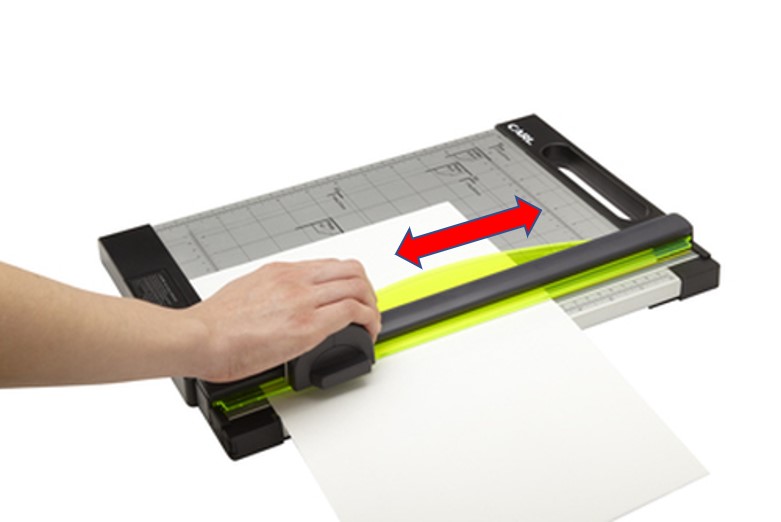
To cut your squares, simply use plain white, regular weight copy paper (8 1/2" x 11") and cut it into squares (5 1/2" x 5 1/2") with a paper cutter.  2 squares can be made out of 1 copy paper sheet.

Guillotine-style cutters make me nervous in the classroom, so I use a rotary cutter with a rolling disk that slides back and forth.  ---  Ask for parent volunteers or dependable older students to help make hundreds of squares.

Yes, cutting your own squares is time-consuming, however, it saves quite a lot of money.


BRIGHT IDEAS:

  • Invite your students to draw cute faces on the origami animals.
  • Tape popsicle sticks (a.k.a. craft sticks) to the back of the structures and transform them into stick puppets!
  • Create a greeting card and glue an origami animal to the front, or hide the origami structure in a pocket you build inside the card for a fun gift.


* * * * * * * * * * * * * * * * * * * * *
If you're ready to purchase materials for your Origami Station, I recommend the following "Kid Tested, Makerspace Guy Approved" items.


TRIED & TRUE BRANDS:


INSTRUCTION BOOK
For purchase information, visit the DOVER PUBLICATIONS website: EASY ORIGAMI - Dover Publications or buy it on AmazonEASY ORIGAMI -Amazon.

NOTE:  My Origami Station usually is just a table that seats 4 students at a time.  I prefer to let no more than 2 students share a book, however, one book per child would be ideal.


ORIGAMI PAPER
DOURA Origami Paper - 750 Sheets Economy Pack

Easy to fold 6" square sheets, 25 beautiful vivid colors, plus the package doubles as a convenient storage box.

Prices vary widely, so make sure to shop around for a bargain.  For purchase info visit AmazonDoura Origami Paper - 750 Count.

NOTE: I keep our box of colored origami paper at my desk to avoid running out so quickly.  Students may come to me for colored square sheets, but first, they must show me their first draft, created using the plain white paper squares.


* * * * * * * * * * * * * * * * * * * * *

Well, my creative friends, I hope this blog entry is useful to you and helps take away the scariness of introducing origami into your classes.

Please feel free to leave any questions or suggestions in the comment section.


Stay creative,
The Makerspace Guy


(Pictures collected for the collages and the photos used for this blog entry were all found online.) 

* * * * * * * * * * * * * * * * * * * * *

I'd love for us to keep in touch!  So, I invite you to my main online platforms:

Please "Follow" and share my Makerspace blog, here on Blogger @
The Makerspace Guy.

You can also connect with me through social media:


Twitter: @makerspaceguy 

Instagram: makerspaceguy

Pinterest: @makerspaceguy


NOTE: Simply click on the orange links to get to each site.


#Makerspace #MakerspaceGuy #TheMakerspaceGuy #STEM #STEMeducation #STEAM #STEAMeducation #art #crafts #ArtsAndCrafts #CraftsForKids #EasyCraftsForKids #MakerspaceOnABudget #ElementarySchool #TipsForTeachers #TeachingTips #ClassroomTips 

#origami #OrigamiForKids #EasyOrigami #EasyOrigamiForKids #JohnMontroll

Sunday, June 20, 2021

Page 1 - I Have an Idea!


Greetings, it's me, Alberto, but you can call me the Makerspace Guy!

"I have an idea!"  What an exciting statement.

Today I had an idea,... a BIG idea!  I decided to create this blog, start a Twitter page, plus reboot my Makerspace Guy Facebook page.  Soon I'd add Instagram and Pinterest too!

I hope to make this blog a valuable resource for educators interested in starting their own Makerspace classes.  It's also my aim to help schools wanting to add Makerspace to their Specials rotation, along with Technology ๐Ÿ’ป, Music ๐ŸŽผ, Art ๐ŸŽจ, and Physical Education ๐Ÿ€.

I've been an Elementary School Makerspace Instructor for several years, with my own classroom.  Teaching grades Kindergarten through 5th has been quite a challenge, but so much fun!

Just what is Makerspace?  Put simply, it's a creative class where students build projects with Lego bricks, paper, cardboard, and other materials.

My plan is to share helpful tips, hacks, and bright ideas which I have discovered while teaching this rarely heard of course.

Please feel free to leave any questions or suggestions in the comment section.

---  Stay creative, The Makerspace Guy


(Pictures collected for the collages and the photos used for this blog entry were all found online.  BTW, that's me in the main photo.) 

* * * * * * * * * * * * * * * * * * * * *

I'd love for us to keep in touch!  So, I invite you to my main online platforms:

Please "Follow" and share my Makerspace blog, here on Blogger @
The Makerspace Guy.

You can also connect with me through social media:


Twitter: @makerspaceguy 

Instagram: makerspaceguy

Pinterest: @makerspaceguy

NOTE: Simply click on the orange links to get to each site.


#Makerspace #MakerspaceGuy #TheMakerspaceGuy #STEM #STEMeducation #STEAM #STEAMeducation #art #crafts #ArtsAndCrafts #CraftsForKids #EasyCraftsForKids #MakerspaceOnABudget #ElementarySchool #TipsForTeachers #TeachingTips #ClassroomTips 

Page 9 - My Favorite Connect-the-Dots Site!

Greetings, it's me, Alberto, but you can call me the Makerspace Guy! CONNECT-THE-DOTS (also known as "Dot to Dot" or "Joi...